Skip to content

AI operations for property and facility teams

From Hello to Handled.

One request. One accountable workflow. A complete record.

Enso PM turns prospect and resident conversations into tours and maintenance follow-through. Enso FM turns after-hours calls and job emails into dispatched, documented work.

Two purpose-built products. One team behind them.

Illustrative · Leasing workflow

Illustrative workflows · Actual setup and availability vary

Built around real conversationsVoiceEmailSMSWeb chat Enso PM

The operating loop

Show the handoff, not just the hello.

Both products are built around the same accountable path from first contact through a documented next step and closeout.

  1. 01

    Answer

    Meet people in the channels they already use.

    Voice · Email · SMS · Web chat on Enso PM
  2. 02

    Understand

    Ask focused follow-ups and keep corrections and context attached.

    Property, urgency, access, contact preferences
  3. 03

    Act

    Create the request, route the work, and give the team a clear next step.

    Tour handoff · Assignment · On-call alert
  4. 04

    Close

    Capture the outcome, confirm completion, and retain the record.

    Updates · Evidence · Confirmation · History

Purpose-built products

Two front desks. Two complete operating journeys.

Each product starts with a different conversation and stays with the work beyond intake.

For property management

Enso PM brings leasing and maintenance conversations into one operating view, helping property teams turn each contact into an organized next step.

Explore Enso PM
01

Unified conversations

Bring phone, email, text, and web chat into inbox, board, schedule, attention, analytics, and search views.

02

Maintenance through confirmation

Structure the request, assign the work, collect updates and photos, document completion, and let the resident confirm or reopen it.

03

Leasing answers with freshness controls

Use approved pricing and availability with source and freshness tracking, so stale information can be withheld.

04

Tour and team handoff

Connect property-specific tour availability and keep the next action visible to the right leasing team.

05

Knowledge for every property

Give Enso approved policies, amenities, documents, inventory, and other property-specific information.

06

Portfolio-ready access

Manage multiple properties with roles and access scoped to the right team members.
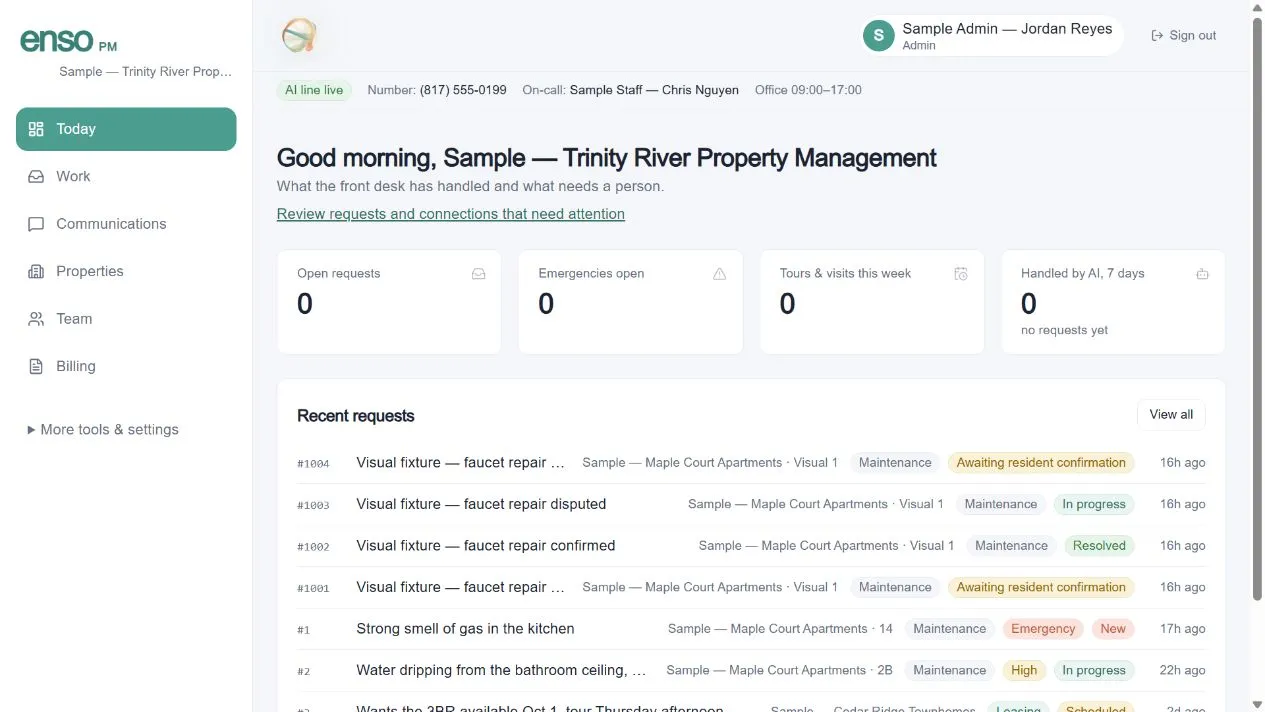
Current product interface
The current Enso PM dashboard showing sample operational metrics and sample recent requests.
Current Enso PM dashboard with sample data

A PM request, end to end

  1. 1

    Prospect or resident reaches Enso

  2. 2

    Intent and property context are organized

  3. 3

    Tour handoff or maintenance request is created

  4. 4

    Staff owns the next action

  5. 5

    Outcome stays documented and confirmed
For facility and service operations

Enso FM turns calls and job emails into structured work orders, then keeps the office, on-call team, technician, and customer aligned through closeout.

Explore Enso FM
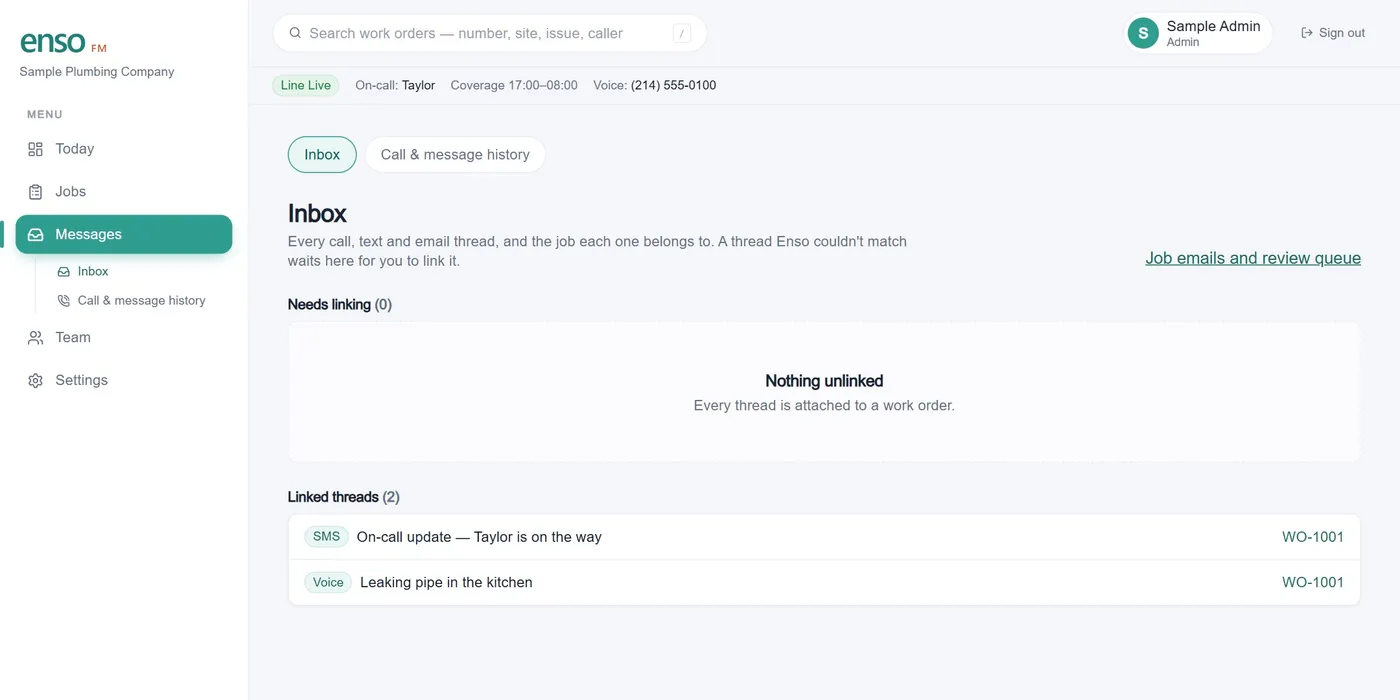
Existing product interface
The current Enso FM inbox showing sample voice and SMS threads linked to work order WO-1001.
Current Enso FM inbox with sample conversations linked to one work order
01

Conversational after-hours intake

Clarify the issue through focused follow-ups, accept corrections, and turn the conversation into a structured work order.

02

Email becomes a work order

Keep the inbox customers already know. Forwarded job emails preserve the original message and supplied attachments for review.

03

Dispatch around real coverage

Use weekly, overnight, and date-specific on-call coverage, then assign and track the job.

04

Field updates by secure link

Technicians can add notes, photos, charges, and completion evidence from a mobile-friendly workflow.

05

Approval before payment

The office reviews the job, the customer confirms or reports an issue, and the payment handoff follows the approved outcome.

06

One searchable job record

Keep communications, attachments, completion evidence, and exportable history connected to the work.

An FM job, end to end

  1. 1

    Caller or job email reaches Enso

  2. 2

    The issue is clarified and structured

  3. 3

    A work order is created and routed

  4. 4

    The technician documents the work

  5. 5

    Office and customer close it out

Connections

Connect on your terms.

Use supported adapters, email, authenticated APIs, signed webhooks, and export workflows. Every connection is labeled by its actual availability.

Explore the platform

Property-management connections

BuildiumConfigured per customer
DoorLoopConfigured per customer
RentvineConfigured per customer
REST, MCP & signed webhooksAvailable paths
Propertyware & Rent ManagerAccess required
AppFolio & YardiComing soon

Work-order system connections

Email forwardingAvailable
Authenticated API & signed webhooksConfigured per customer
CSV and full-record exportsAvailable
Native CMMS connectorsComing soon

Availability varies by product, plan, account access, configuration, and third-party provider. “Coming soon” items are not currently available.

Control and accountability

Move faster without losing control.

The strongest proof is how the workflow behaves when the answer is uncertain, a delivery is retried, or a person needs to step in.

01

Human review for uncertainty

Ambiguous, incomplete, or sensitive requests can be routed to people instead of being guessed through.

02

Consent-aware messaging

Messaging workflows support consent records, contact preferences, and STOP controls.

03

Protected connections

Scoped access, authenticated reporting, and signed webhooks help keep each account and workflow separated.

04

Traceable history

Conversations, updates, delivery status, and completion evidence stay connected to the work record.

From Hello to Handled.

See how Enso handles the handoff.

Walk through the workflow that matters to your team—from first contact to a documented next step and closeout.